
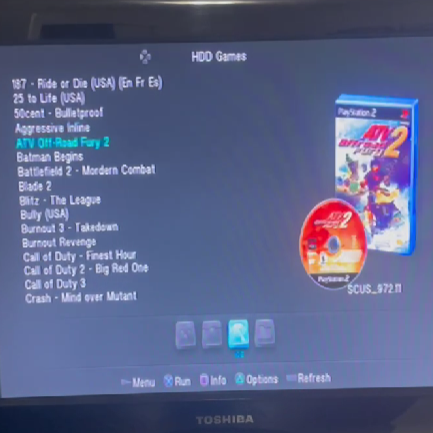
The PS2Ultra is a funny name for “extremely easy Softmod that everyone does to their PS2”.
To casuals, I am a wizard
To me, I’m a dumb idiot for an entire week
My original PS2 took me a lot longer to make, but I more recently made a second one for a buddy who had made a status inquiring about buying old PS2 games. I’m intending to document the process and the ideas here in hopes that I can spread the love to more people, whether helping them make their own, or making one for them.
What Is It?
The PS2Ultra is essentially a phat PS2 with a FreeMCBoot memory card to jailbreak it and a hard drive containing hundreds of games. (That spot in the back you used to hide weed in as a kid? Yeah, that has a hard drive port in it!)
It takes a while to get here though. Learning to use the FreeMCBoot apps (like a super old school file browser, game launching software, a program to rip games from your discs onto your drive, etc) and learning to set the hard drive up (downloading hundreds of games, finding the right software to install the games to the hard drive) are both their own little bundles of joy.
I won’t get into either too much here, but I’ll talk about some things I find interesting. PS2 hard drives do NOT let you use Windows Explorer to copy files over. They actually require individual partitions for each game, which makes installing and uninstalling games a bit of a bitch. To get cover art associated with the games in OPL (the game launcher) they do an awesome thing where you can auto-pull all the images from their database on PC, but then actually copying it onto the hard drive requires you to transfer the files onto the hard drive via a USB in the actual PS2 itself.
Final thing to note mod wise is that you need an add-on piece to actually use the hard drive bay. You can buy a third party SATA adapter that plugs nicely into the slot and reads SATA drives. Alternatively, the way I like to do it, is to get an original hardware Sony adapter and replace some of the internals. The Sony one comes with an ethernet port that lets you play online, so I prefer using these hard drive adapters. You can buy this little chip online to replace the old internal hard drive plug with a SATA one, it’s fairly easy to install (even I managed to do it).
Other contributions to the process are getting your output into HDMI incase you’re using a TV from the past decade that doesn’t have component cables, getting some wireless controllers incase you’re a non-psychopath, and figuring out your memory card/save game situation.
How To Do It
- Buy a FreeMCBoot memory card from Amazon and plug it in. You’re half way there.
- There is FreeHDBoot that you can do straight from your hard drive but it takes waaay longer each time you boot, so the memory card is convenient.
- Get a hard drive, and an external hard drive reader, and then format the drive using HDL Batch Installer.
- Get all the games you want, and install them to the hard drive via HDL Batch Installer.
- Not gonna tell you how to get games.
- My first time I tried to install games via HDL Batch Installer, I went to let it install overnight but it forced me to click Ok after every game and I just pulled an all nighter to complete it instead lol. There is a checkbox in settings about preventing that popup, something to do with custom logos.
- Get OPL Manager for PC if you want to install cover art and stuff to see in the games list when selecting one to play. I didn’t do this for my personal PS2, so I’ll skip over this.
- Buy a Composite-To-HDMI converter. Beware, there are no such thing as a “good cheap” one of these. You will get input lag. Now, I got a decently cheap one when I made one for a homie as he wasn’t that concerned, but the one I got for personal use was like $600. I also run my N64 through it, so I got a switcher that has both consoles plugged into it. It’s a fugly setup that is insane, but it fixes the output for when I capture gameplay for videos, so it was kind of a necessary evil for this section of the site.
- Buy a memory card for your save games. I only trust original Sony 8mb ones, as some games trip the fuck out of your memory card is over 8mb (I’ve heard Vice City and Kingdom Hearts as examples). I don’t wanna risk corrupted saves n shit, so I stay safe. I have heard good things about the memory cards that keep “pages” so it’s way larger than 8mb but you switch between multiple 8mb slots on it, but those get a little pricey.
- For reference, a lot of optimized save games float below 200kb. But some games like Sims or Socom can run you like 2mb per save, which is rediculous.
- Buy a controller. This one has a lot of options but I’ll list my favourite 2 (apart from the good ole original PS2 controller). First, 8bitdo sells this bluetooth adapter that can connect current gen controllers wirelessly and auto maps them to the right buttons (so my Xbox Series X controller works exactly how I’d expect it to) and that is an absolute luxury. Second option is this 2pack on Amazon that uses a 3d printed shell that’s 1:1 with the original PS2 controller, with the only drawback being that it uses AAA batteries.
And congrats. You now have an entire console generation of games at your disposal. I suppose I could hit you with recommendations or something here, but I’ll let it speak for itself and catch you later.
cheers,
calv